∿FREE
Mini RSI
RSI signals. Automated paper trading.
Start with Backtest Mechanic: create a brand-new strategy or bring one of our trading bots into the local workshop for testing and diagnostics. Then explore the fleet. Free bots? Those are our Courtesy Cars.
The workshop for the entire bot fleet. Build and backtest a strategy from scratch, or select one of our supported trading bots and import its JSON settings into Backtest Mechanic on your own computer. HAL-assisted diagnostics and controlled repairs are the goal—without uploading your strategy to our website.
Choose your bot model, import its matching JSON configuration locally, then inspect, backtest and investigate possible improvements. Bot-specific adapters are being developed.
Start with a blank workbench, create your own rules and backtest the result. Choose Backyard Mechanic, The Garage or The Factory for your preferred level of HAL assistance.
Select the model you want to service. Each compatible bot will use its own adapter to interpret the strategy correctly—not just load arbitrary JSON.
Choose Trend Bot but import ZigZag Bot settings? The installed app will identify the mismatch and stop before testing. No silent conversion, no corrupted configuration.
Planned integration: actual support will be enabled and verified bot by bot. A successful JSON import alone does not establish accurate backtest compatibility.
Take a free bot for a test drive. Mini RSI, Mini Scalper and IF/Then Bot are introductory beta editions; full-featured versions are planned for later.
RSI signals. Automated paper trading.
One-click chart plans. Manual entries, stops and targets.
Build IF/THEN rules and test them with IBKR Paper.
Plan LONG and SHORT trades directly on live broker-connected charts, with visual entry, target and protective stop levels.
Free Beta includes core tools; Premium adds edition-dependent capabilities. Broker subscriptions may be required for live data.

A central desktop hub to launch and organize your Trading Bots software. Completely free to download.
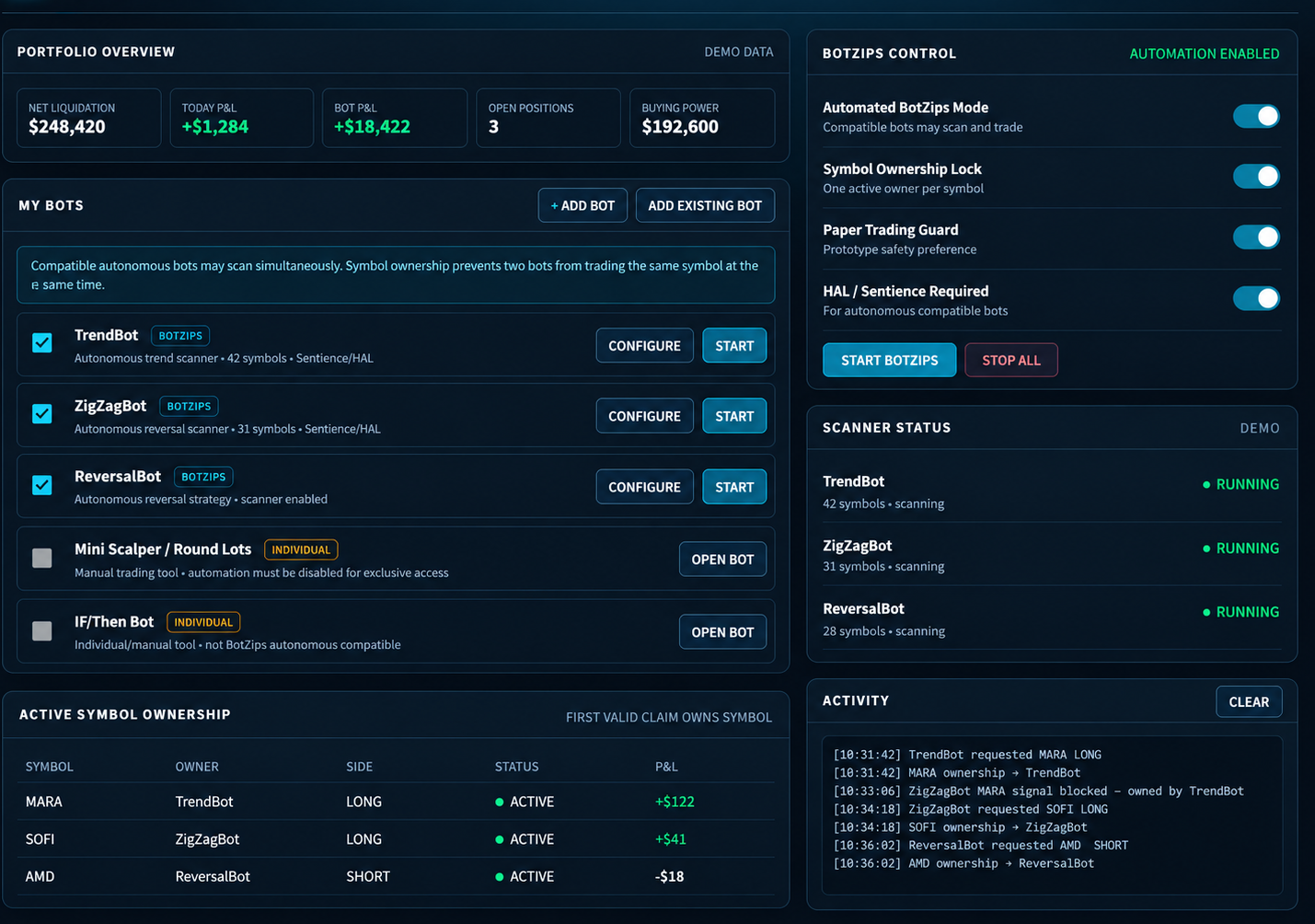
A look at the planned Premium evolution, with multi-bot automation, symbol ownership, portfolio overview, scanner status and activity monitoring. Concept preview — not the current beta interface.
HAL evaluates signals, market conditions and strategy decisions inside supported trading bots. It is independent of BeeBot and The HIVE.
HAL helps evaluate signals, market conditions and strategy decisions. Manual, Hybrid and Sentience capabilities vary by bot and edition.
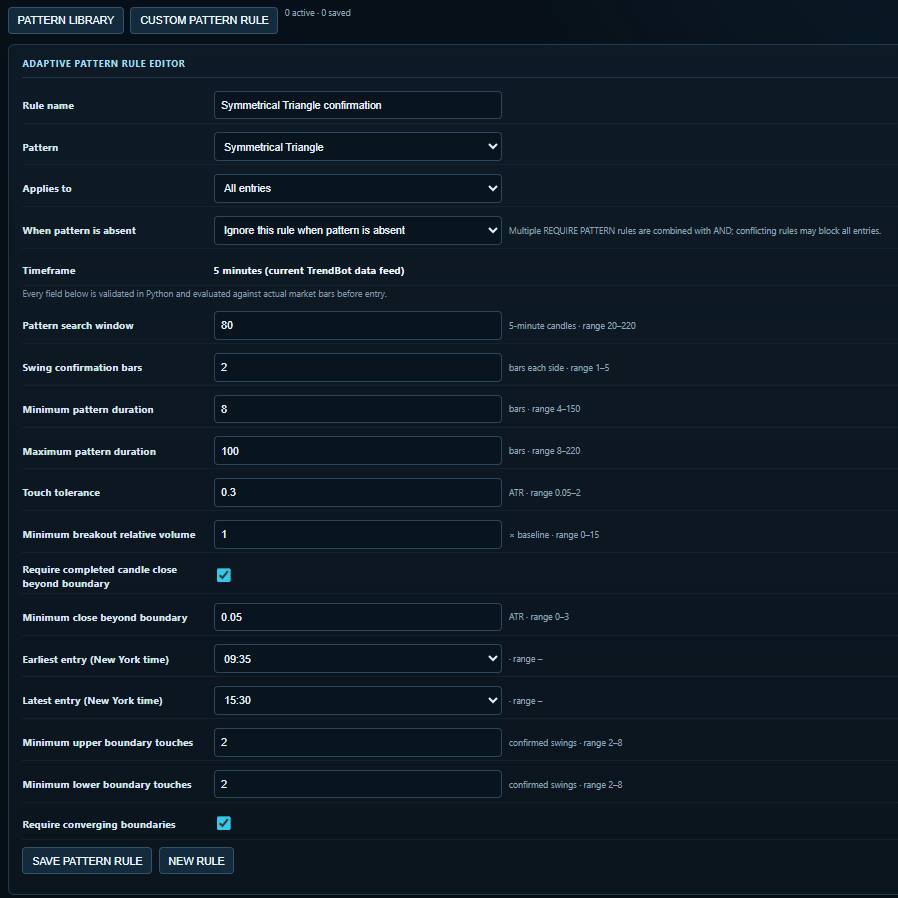
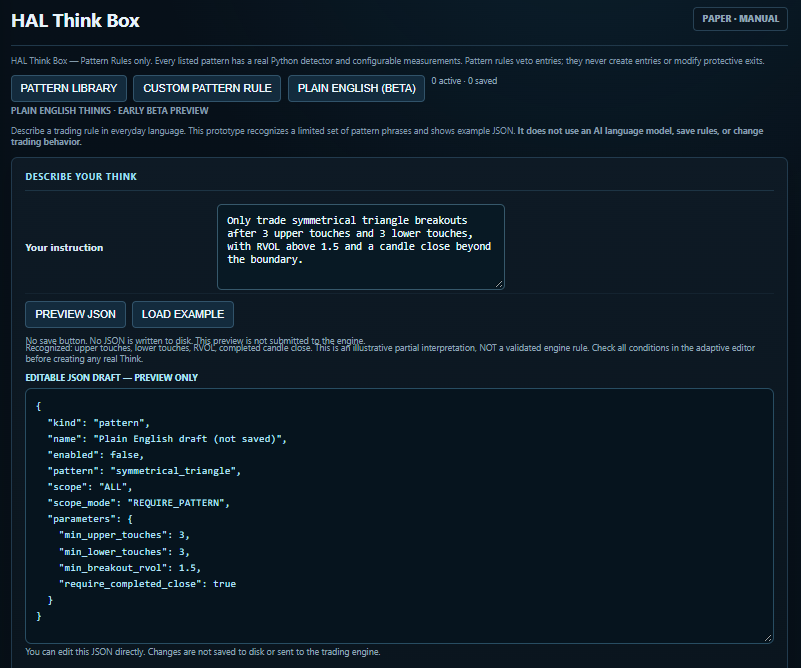
Go beyond preset strategies. Build precise pattern-entry rules in the Custom Pattern Rule editor, or try describing an idea in everyday language using the new Plain English (Beta) tab.
EARLY BETA — Plain English currently uses a limited phrase interpreter, not an AI language model. Its JSON output is an editable preview only: it is not saved, validated as a live rule or sent to the trading engine. More language understanding, patterns and rule options are planned. Availability depends on bot and edition.
Additional strategy bots are in development. No downloads are available yet.
No bots selected yet.
Choose a beta bot or add the free Control Center.
Start with RSI. Learn automated RSI signal trading with a simple paper-trading workflow.
This is a free introductory beta edition for learning and testing the workflow. A more full-featured version is planned for a later release.
One-click Windows installation is the release goal: no need to install Python or broker libraries separately. Installer packaging is pending verification. IBKR TWS or Gateway and any required market-data subscriptions remain separate. Downloads will be enabled when verified packages are uploaded.
Stage the trade yourself. Manual chart-based scalping tool for precise entries, protective stops and hands-on position management.
This is a free introductory beta edition for learning and testing the workflow. A more full-featured version is planned for a later release.
One-click Windows installation is the release goal: no need to install Python or broker libraries separately. Installer packaging is pending verification. IBKR TWS or Gateway and any required market-data subscriptions remain separate. Downloads will be enabled when verified packages are uploaded.
Build straightforward IF/THEN trade rules and run them as an individual trading tool.
This is a free introductory beta edition for learning and testing the workflow. A more full-featured version is planned for a later release.
One-click Windows installation is the release goal: no need to install Python or broker libraries separately. Installer packaging is pending verification. IBKR TWS or Gateway and any required market-data subscriptions remain separate. Downloads will be enabled when verified packages are uploaded.
Momentum meets autonomy. Scan and filter candidates, qualify a setup, then automate the opening long and confirmed reversal short cycle.
One-click Windows installation is the release goal: no need to install Python or broker libraries separately. Installer packaging is pending verification. IBKR TWS or Gateway and any required market-data subscriptions remain separate. Downloads will be enabled when verified packages are uploaded.
Find the turn. Looks for reversal setups using RSI divergence and price confirmation.
One-click Windows installation is the release goal: no need to install Python or broker libraries separately. Installer packaging is pending verification. IBKR TWS or Gateway and any required market-data subscriptions remain separate. Downloads will be enabled when verified packages are uploaded.
Find the trend. Scans for sustained directional movement and qualifying trend opportunities.
One-click Windows installation is the release goal: no need to install Python or broker libraries separately. Installer packaging is pending verification. IBKR TWS or Gateway and any required market-data subscriptions remain separate. Downloads will be enabled when verified packages are uploaded.
Trade the swings in between. Looks for price-structure opportunities between major trends and reversals.
One-click Windows installation is the release goal: no need to install Python or broker libraries separately. Installer packaging is pending verification. IBKR TWS or Gateway and any required market-data subscriptions remain separate. Downloads will be enabled when verified packages are uploaded.
Built to look for price breaking out of established ranges and qualifying breakout setups.
Multi-strategy trading bot designed to scan for and manage long and short trading opportunities.
Short-dated options trading bot focused on 0–3 DTE opportunities.
Options-focused bot built around the wheel strategy and position management.
Dividend-focused automation and tracking tools for income-oriented portfolios.
LIVE CLICK TRADING from the chart: plan LONG and SHORT entries visually, set bracket-order entry, stop-loss and take-profit levels, and work with live broker-connected pricing.
Features, live order routing and broker support vary by installed beta build and edition. Chart-based trading is not the same as an autonomous trading bot. Confirm the order details and paper-test before live use.
Free desktop hub for launching and organizing installed Trading Bots tools. Download package will be linked after upload.
Two ways to customize your thinking: use the adaptive Custom Pattern Rule editor to define supported pattern-entry conditions, or experiment with the Plain English (Beta) tab by describing a trade idea in everyday language.
Custom Pattern Rule: select a supported pattern and configure its measurements, including touches, swing confirmation, breakout closes, relative volume and trading-session limits. Where supported by the bot, saved and enabled pattern rules are evaluated before entries and may block trades that fail their conditions.
Plain English (Beta): a limited local phrase interpreter recognizes selected pattern conditions and creates an editable JSON draft. Press Preview JSON to generate it, then edit the JSON yourself. This tab does not use an AI language model; it does not save, validate or submit the draft to the trading engine.
Explore the two screenshots in the HAL Think Box feature card. More patterns, language capabilities and customization are planned as they are built and tested. Feature availability varies by bot and edition. Pattern recognition and automation cannot guarantee trading results.
HAL is the configurable intelligence layer used by higher-level trading bots for signal evaluation and market-context checks. Modes and actual capabilities differ by bot, Free Beta and Premium release.
Planned opt-in network for sharing strategy setups, selected symbol metrics and aggregate results. BeeBot is intended as the sole direct Hive connector. Other bots retain local CSV history, with optional historical imports through BeeBot. Not yet live.